Overview
Checkout Page
Checkout Page Overview
Checkout page is Winpay's integrated checkout solution designed to simplify payment acceptance. Start receiving payments via Virtual Accounts, QRIS, and e-Wallets seamlessly using a single integration.
When using the API checkout page itself, one merchant ID can have more than one different credential (api key and secret key), so each credential can be differentiated from the invoice name, active channel, logo and callback URL.
Sequence Diagram
The following sections will explain about the technical details for each process in this service.
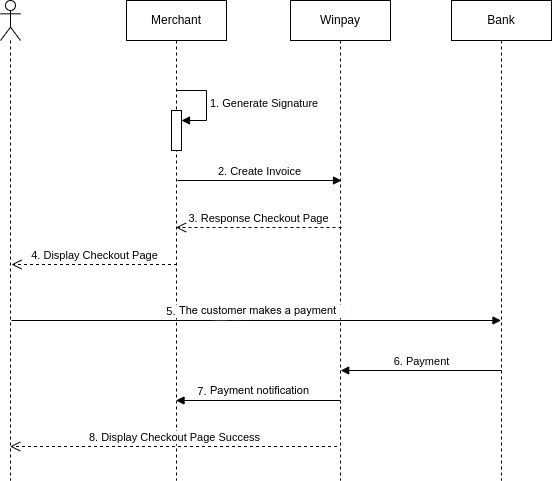
Description:
| No | Process | Related documents | Description |
|---|---|---|---|
| 1 | Generate Signature | Signature Generation | Merchant generates signature |
| 2 | Create Invoice | Create Invoice | Merchant request checkout page via API provided |
| 3 | Response Checkout Page | Merchants get a create invoice response in the form of a url | |
| 4 | Display Checkout Page | Merchant displays checkout page url to customer | |
| 5 | Customer makes payment | Customer makes payment to the selected payment method | |
| 6 | Payment | The bank provides payment notification to Winpay | |
| 7 | Payment Notification | Callback | Winpay provides payment notifications to Merchants |
| 8 | Display Checkout Page Success | Winpay displays the url of the invoice that has been paid to the customer |
URL
| URL | Environment |
|---|---|
| https://sandbox-checkout.winpay.id | Development |
| https://checkout.winpay.id | Production |